Connection Pooling in CloudNativePG: Managing Postgres Connections Efficiently
Connection management is a critical aspect of running PostgreSQL databases. Whether you are operating a single instance or a high-availability failover cluster, applications can quickly run into connection limits. When too many connections are open, new ones get rejected, leading to application errors and downtime.
Effective connection management should happen on both the client and server sides. You can limit the number of connections your applications open, while the database server enforces its own maximums. This is important for two main reasons:
- An idle connection still consumes RAM and system resources.
- Each additional connection increases overall memory usage, which can strain your infrastructure as the number of connections grows.
This is where PgBouncer shines. PgBouncer acts as a lightweight connection pooler that sits between your applications and PostgreSQL. It reuses and recycles connections according to your configuration, ensuring you never exceed defined limits while dramatically improving efficiency.

PgBouncer Pooling Modes
PgBouncer supports three main pool modes, each suited to different application behaviors:
- Session Mode: A connection is assigned to a client for the entire duration of its session (from login until logout). This mode is the most compatible with applications that rely on session-level state, temporary tables, or prepared statements. It provides the highest compatibility but uses connections less efficiently.
- Transaction Mode: The connection is returned to the pool after each transaction completes. This mode offers a good balance between compatibility and resource efficiency. Most modern applications work well here.
- Statement Mode: The connection is released back to the pool after every single SQL statement. This is the most efficient mode for resource usage but has the strictest compatibility requirements—applications cannot use transactions spanning multiple statements or rely on session state.
Choosing the right mode depends on your application’s behavior. Some apps work best in session mode, while others perform well in transaction mode. See my post about pgbouncer and gitea as example.
Setting Up Pooling with CloudNativePG
CloudNativePG (CNPG) includes built-in support for PgBouncer through a dedicated Pooler resource. The operator does not create poolers automatically—you must define and apply them yourself.
Key points about CNPG poolers:
- You can create multiple poolers for a single cluster.
- A pooler cannot serve multiple clusters.
- Poolers can target read-write (
rw) or read-only (ro) traffic. - Poolers can serve different modes.
Here is an example of a basic read-write pooler in session mode:
apiVersion: postgresql.cnpg.io/v1
kind: Pooler
metadata:
  name: pooler-example-rw
  namespace: your-namespace
spec:
  cluster:
    name: cluster-example
  instances: 3
  type: rw
  pgbouncer:
    poolMode: session
    parameters:
      max_client_conn: "1000"
      default_pool_size: "10"
Notes on the configuration:
The pooler name is your choice but cannot match the cluster name.
It must be deployed in the same namespace as the cluster.
Using suffixes like -rw or -ro helps when running separate read-write and read-only poolers, as well as describing the mode (-session).
The read-write pooler attaches to the primary instance and automatically follows failovers.
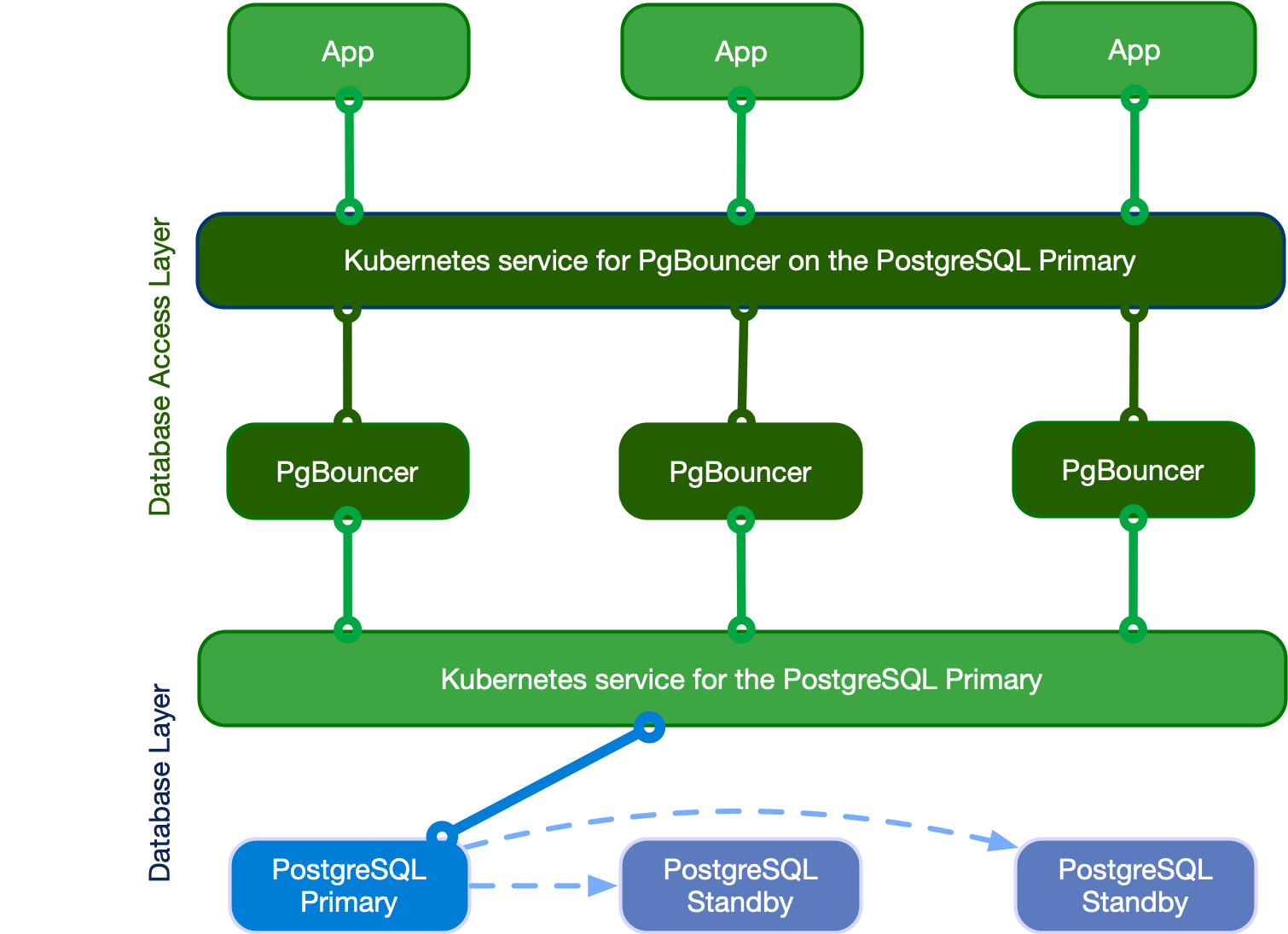
General Flow of PgBouncer:
- Applications connect to the PgBouncer service instead of the PostgreSQL cluster directly.
- PgBouncer accepts incoming client connections and manages a smaller pool of actual connections to PostgreSQL.
- When a client requests data, PgBouncer assigns (or reuses) a backend connection.
- After the operation (depending on the pool mode), the connection returns to the pool for reuse.
- This dramatically reduces the load on PostgreSQL while keeping resource usage predictable.
Why Multiple Poolers Are Often Needed
Not every application behaves well with the same pooling mode. For example, some tools work flawlessly in session mode but fail in transaction mode, while others show the opposite behavior. Since the pool mode is set at the pooler level, it is common to run multiple poolers—one for each required mode—and point different applications to the appropriate one.
External Access to Poolers
For applications running outside the Kubernetes cluster, expose the poolers using NodePort or LoadBalancer services. Because external load balancers typically cannot route the same port to different backends, assign different ports to each pooler (e.g., 5432 for one and 6432 for another).
Additional Configuration Options
You can fine-tune PgBouncer with many parameters. For a complete list, refer to the official CNPG documentation on PgBouncer configuration options.
Monitoring and Observability
CNPG’s PgBouncer pooler includes a built-in Prometheus exporter with metrics prefixed by cnpg_pgbouncer_. Adding the proper scrape configuration to Prometheus allows you to collect these metrics and build insightful dashboards in Grafana.
The official CloudNativePG Grafana dashboard works great with these metrics.
Important reminder: Simply creating a pooler is not enough. You must update your applications to connect through the pooler service instead of the cluster service directly. Monitoring these connections and pool utilization is essential for performance tuning and ensuring everything runs smoothly.
Connection pooling with PgBouncer in CloudNativePG is one of the most effective ways to keep your PostgreSQL clusters stable and performant under load. Taking the time to configure the right modes and monitor usage pays off significantly in reliability and resource efficiency.
The next post in this series will look into monitoring CNPG, a very interesting topic.
Did you find this post helpful? You can support me.



Related posts
- Databases – Postgresql – Pilot
- Databases – Postgresql – Gitea and PGBouncer
- Databases – Postgresql – PGbouncer
- CNPG – Cloud Native Postgresql – Pilot
- CNPG – considerations for migrating databases
- CNPG – installation
- CNPG – Installation – Roles and Databases
- CNPG – Installation – Database Import
- CNPG – Installation – Monitoring
- CNPG – Configuration – TLS Encryption
Author Profile