Enhancing Blog Posts with Mermaid Diagrams: Why They’re a Game-Changer (and How to Make Them Work Everywhere)
In today’s technical blogging world, clear, accurate, and up-to-date diagrams are essential for explaining complex systems—whether it’s architecture, workflows, data flows, or infrastructure layouts like the Puppet setups we’ve been exploring in this series.
For years, tools like Microsoft Visio, Lucidchart, draw.io (now diagrams.net), or even PlantUML have been go-to solutions. However, more and more authors (especially in the DevOps, cloud, and open-source communities) are turning to Mermaid — and for good reason.
In this post, we’ll explore:
- What Mermaid is and why it’s gaining so much traction
- How it compares to traditional diagramming tools like Visio and draw.io
- The biggest challenge when publishing Mermaid diagrams on blogs
- The elegant solution: rendering Mermaid to PNG during the publishing pipeline (exactly what I’ve now implemented!)
What Is Mermaid?
Mermaid is a JavaScript-based diagramming and charting tool that lets you create diagrams entirely from text using a simple, Markdown-friendly syntax.
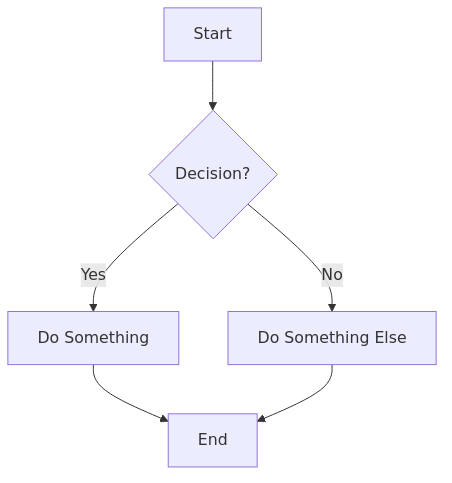
Example: A simple flowchart
graph TD
A[Start] –> B{Decision?}
B –>|Yes| C[Do Something]
B –>|No| D[Do Something Else]
C –> E[End]
D –> E
That tiny block of text becomes a clean, professional-looking flowchart when rendered:
Mermaid supports many diagram types out of the box:
- Flowcharts (graph)
- Sequence diagrams
- Class diagrams
- State diagrams
- Entity-Relationship diagrams
- Gantt charts
- Pie charts
- Requirement diagrams
- Git graphs
- …and more!
Why Mermaid Is Winning Hearts in 2025/2026
Here are the key advantages of Mermaid compared to traditional tools like Visio, Lucidchart, or even draw.io:
| Feature | Mermaid | Visio / Lucidchart / draw.io |
|---|---|---|
| Version control friendly | 100% text → perfect for Git | Binary files or proprietary formats |
| Diffs & reviews | Easy to see changes in PRs | Almost impossible without special viewers |
| Editing speed | Extremely fast (just type) | Requires opening a GUI tool |
| Cost | Completely free & open source | “Visio = paid Lucidchart = subscription” |
| Dependencies | Just a JS library or CLI | Needs installed software or account |
| Integration with Markdown | “Native (GitHub, GitLab, Obsidian, etc.)” | Requires exporting images manually |
| Maintainability | Change one line → diagram updates | Must manually reposition elements |
| Collaboration | Works in any text editor + Git | Requires shared accounts or export/import cycles |
| Reproducibility | Same text → same diagram every time | Risk of “font substitution” or layout shifts |
In short:
Mermaid turns diagrams into code — which means they become first-class citizens in your documentation repository, just like your README, tests, or configuration files.
The One Big Challenge: Platform Support
While GitHub, GitLab, Obsidian, Notion (recently), and many static site generators now render Mermaid natively, many popular blogging platforms still do not:
- WordPress (even with plugins) often has inconsistent or outdated Mermaid support
- Medium does not support Mermaid at all
- Dev.to supports it only partially
- Hashnode has good support but can be finicky with themes
- Company wikis, Confluence instances, or older platforms → usually no native rendering
So what happens when you paste a beautiful Mermaid code block into a blog post on one of these platforms?
→ It just shows up as plain text — completely useless to readers.
The Solution: Render Mermaid to PNG in Your Publishing Pipeline
This is exactly the problem I wanted to solve for my Puppet blog series.
How it works
- Detect Mermaid code blocks
The pipeline looks for standard fenced code blocks starting with “`mermaid - Generate a unique hash based on the exact content of the diagram
→ Identical diagrams are rendered only once (great for performance and storage) - Render the Mermaid code to a high-quality PNG
Using a headless browser + Mermaid CLI (or a Node.js renderer). In my case, Jenkins runs that as part of the pipeline. - Upload the PNG to the blog’s media library (e.g., WordPress media uploads) or an S3 bucket.
- Replace the original code block with proper Markdown image syntax:
 . In my case this is done by the python logic of the pipeline at runtime.
 - Fallback behavior
If rendering fails for any reason → the original Mermaid code block remains unchanged (and an error is logged)
Benefits of this approach
- Works on every platform — even those with zero Mermaid support, since a centrally placed image is loaded
- No broken diagrams — readers always see a nice image
- Still version-controlled — the source Mermaid code lives in your repo
- Deduplication — same diagram across multiple posts reuses the same image file
- High resolution — PNGs look crisp on retina displays
- SEO-friendly — images have proper alt text (you can customize this further)
When to Use Mermaid vs. Traditional Tools
| Use Case | Recommended Tool | Why? |
|---|---|---|
| Infrastructure / architecture docs | Mermaid | “Lives in Git, easy to update perfect for CI/CD pipelines” |
| Quick flowcharts in READMEs | Mermaid | Native GitHub rendering |
| Complex interactive dashboards | Lucidchart / draw.io | Better for drag-and-drop and heavy collaboration |
| Official company org charts / presentations | Visio / PowerPoint | “Polished look, integration with Microsoft 365 ecosystem” |
| One-off pretty diagrams for blog posts | draw.io (export PNG) | “Fast to create, great styling options” |
| “Long-lived frequently updated docs” | Mermaid | Minimizes maintenance pain |
Final Thoughts
Mermaid isn’t trying to replace heavy-duty GUI tools like Visio or Lucidchart — it’s solving a different problem:
“How can I keep my diagrams in sync with my code, version-controlled, and easy to maintain forever?”
By rendering Mermaid diagrams to PNGs during the publishing process, we get the best of both worlds:
- The maintainability and reproducibility of text-based diagrams
- The universal compatibility of plain old images
This new pipeline is now live for all coming series like the Puppet series — so all future architecture diagrams (like the Puppet HA setup with Foreman, compile masters, and PuppetDB) will render beautifully, no matter where you read the blog.
Have you started using Mermaid in your documentation?
Or are you still exporting screenshots from draw.io?
Let me know in the comments — I’d love to hear your workflow!
Happy diagramming! 🚀
Did you find this post helpful? You can support me.



Related posts
- Building a Write-Once Publishing Pipeline
- Publishing Pipeline v1.1.0 – Dev.to Support and What Comes Next
- Publishing Pipeline v1.2.0 – backlinks and X support
- Publishing Pipeline – Refactoring
- Publishing Pipeline – LinkedIn Support
- Publishing Pipeline – Telegram
Author Profile