Secure Remote Monitoring Made Simple: confdroid_nrpe Completes Your Puppet-Powered Nagios Setup
If you’re already using confdroid_nagios for automated, exported-resource monitoring, the missing piece was always the client side. That piece is now here.
confdroid_nrpe is the clean, client-only Puppet module that installs and configures NRPE (Nagios Remote Plugin Executor) on every host you want to monitor. It works hand-in-hand with the Nagios server so checks run securely and automatically across your entire infrastructure.
source code: https://sourcecode.confdroid.com/confdroid/confdroid_nrpe
Detailed overview: https://deepwiki.com/grizzlycoda/puppet_collection/4.7-confdroid_nrpe
Why NRPE Matters
A central Nagios server can’t peek inside every machine without help. NRPE lets the server ask remote Linux hosts to run local check plugins (disk space, CPU load, processes, custom scripts, etc.) and return the result instantly. This keeps monitoring lightweight, secure, and fast — exactly what traditional VM and bare-metal environments need.
What confdroid_nrpe Delivers
The module is built for Rocky Linux 9 and similar RedHat-based EL systems (Puppet 8 ready) and follows the same clean philosophy as the rest of the confdroid collection:
- Installs the NRPE daemon and creates the dedicated
nrpesystem user - Sets up proper directory structure with correct permissions and SELinux contexts
- Manages
nrpe.conf(including allowed_hosts from your Nagios server) - Handles
nrpe.cfgfor dynamic check commands - Grants sudo rights to the Nagios user when checks need elevated privileges
- Dynamically defines custom NRPE commands (no manual config files)
- Optionally opens the firewall port (TCP 5666) and applies SELinux exceptions
- Ensures the NRPE service is running and enabled
- Optionally enables SSL / TLS encryption
Seamless Integration with confdroid_nagios
Other confdroid modules (Apache, PostgreSQL, etc.) already export their Nagios checks via PuppetDB. When you apply confdroid_nrpe on a client:
- The client registers itself (or gets collected by the server)
- Check commands are written automatically into
nrpe.cfg - The Nagios server starts actively querying the host over NRPE
No manual host definitions. No SSH keys. No guesswork.
How Nagios Connects to Clients and Runs Checks
Here’s exactly what happens behind the scenes:
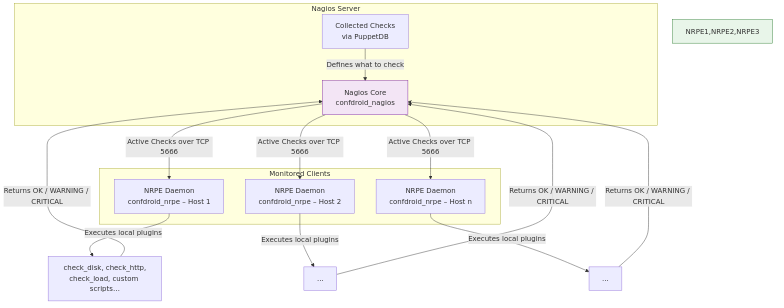
The Nagios server simply connects to port 5666 on each client, tells NRPE which command to run, and receives the result in seconds.
Quick Start
Add the module to your Puppetfile:
  mod 'confdroid_nrpe',
  git: 'https://sourcecode.confdroid.com/confdroid/confdroid_nrpe.git'
Then declare it:
- via site.pp or nodes.pp
node 'example.example.net' {
  include confdroid_nrpe
}- through Foreman:
In order to apply parameters through Foreman, confdroid_nrpe::params– must be added to the host or host group in question, unless the defaults are fully acceptable across the estate.
That’s it. Your clients are now ready for fully automated monitoring.
Final Thoughts
With confdroid_nagios on the server side and confdroid_nrpe on every client, you get a complete, zero-touch Nagios setup driven entirely by Puppet and PuppetDB. No more manual config files, no more forgotten hosts, and rock-solid security on every endpoint. If you’re running traditional infrastructure (VMs, bare metal, or a hybrid mix), this combination is hard to beat. Ready to add remote checks to your stack? Grab the module today and let Puppet do the heavy lifting. Questions or feedback? The source is open — comments welcome!
Did you find this post helpful? You can support me.




Related posts
- Confdroid Puppet Modules – Pilot
- Confdroid Puppet Modules – Puppet
- ConfDroid Puppet Modules – confdroid_resources
- ConfDroid Puppet Modules – Postgresql
- ConfDroid Puppet Modules – Gitea
- ConfDroid Puppet Modules – Apache
- ConfDroid Puppet Modules – Nagios
- ConfDroid Puppet Modules – Fail2ban
- ConfDroid Puppet Modules – Automatic
Author Profile