
Getting Started with Ansible: Repository Best Practices and Security Essentials
Welcome to the first installment of our Ansible series! Whether you’re freshening up your skills like many of us do from time to time or diving into Ansible for the first time, this post will set you up with a solid foundation. Ansible is a powerful, agentless automation tool for configuration management, application deployment, and orchestration. It’s simple yet scalable, making it ideal for managing everything from a homelab to enterprise infrastructures.
In this opener, we’ll focus on how to structure your Ansible repositories effectively—debating the merits of a single repo versus separating variables and secrets. We’ll also walk through a real-world scenario for handling diverse hosts, emphasize security (because automation without safeguards is a recipe for disaster), and visualize a typical workflow with a Mermaid diagram. By the end, you’ll have a blueprint to start your own projects securely and efficiently.
Future posts will cover advanced topics like role development, testing with Molecule, integrating with cloud providers, and optimizing for large-scale environments. Let’s jump in!
Choosing Your Repository Structure: Single Repo vs. Separate Vars/Secrets
When starting with Ansible, one of the first decisions is how to organize your code. You have two main approaches: keeping everything (playbooks, roles, inventories, variables, and even encrypted secrets) in one repository or splitting variables and secrets into a separate repo. Both are valid, but your choice hinges on team size, security needs, and workflow complexity.
The Single Repository Approach
This is the go-to for individuals, small teams, or when you’re just getting (re)started. Everything lives in one Git repo, making it easy to clone, develop, and run playbooks locally. A recommended structure looks like this:
ansible-project/
├── inventories/
│   ├── production/          # Host lists for prod env
│   └── staging/             # Separate for non-prod
├── group_vars/
│   ├── all/
│   │   ├── vars.yml         # Non-sensitive defaults
│   │   └── secrets.yml      # Vault-encrypted sensitive data
│   └── webservers/          # Group-specific vars
├── host_vars/               # Per-host overrides
├── playbooks/               # Your main YAML playbooks
├── roles/                   # Reusable roles (e.g., common, nginx)
├── ansible.cfg              # Config overrides
└── requirements.yml         # Galaxy collections/roles
Pros:
- Simplicity: Clone once, and you’re ready to ansible-playbook site.yml.
- Focus on learning: Spend time on Ansible concepts like variable precedence, facts, and handlers instead of managing multiple repos.
- Built-in security: Use Ansible Vault to encrypt sensitive files or individual variables (e.g.,!vault | inline). Vault uses AES-256 encryption, which is robust enough for most use cases.
Cons:
- Potential for over-exposure: If your repo is shared, everyone with access can see the structure of secrets (even if encrypted). In larger teams, this might violate least-privilege principles.
The Separate Vars/Secrets Repository Approach
As your setup grows—think multiple teams, strict compliance (e.g., PCI-DSS, HIPAA), or environments with siloed access—move sensitive variables and inventories to a dedicated repo. Non-sensitive playbooks and roles stay in the main repo.
Example:
ansible-playbooks/(public-ish: playbooks, roles)ansible-secrets/(restricted: vars, inventories, Vault files)
Pros:
- Enhanced security: Limit access to the secrets repo. Developers can contribute to playbooks without ever touching production credentials.
- Better for environments: One secrets repo per env (or branches with protections) reduces mix-ups.
- Compliance-friendly: Auditors love separation of code (logic) from data (configs/secrets).
Cons:
- Added complexity: You’ll need to clone both repos, use –extra-vars @../secrets/vars.yml, or integrate via Git submodules/symlinks. This can slow onboarding and local testing.
My Recommendation
If you’re refreshing skills or working solo/small team, start with a single repo. It’s simpler and lets you iterate quickly. Encrypt only what’s truly sensitive—don’t Vault everything, as it complicates diffs and reviews. Use multiple Vault passwords or IDs for different environments (e.g., ansible-vault encrypt --vault-id prod@prompt prod_secrets.yml).
Once pain points emerge (e.g., too many people accessing prod secrets), migrate secrets to a separate repo or—even better—dynamic sources like HashiCorp Vault, AWS Secrets Manager, or Azure Key Vault. Pull secrets at runtime with lookup plugins to avoid Git entirely. This hybrid is a 2026 best practice for zero-trust environments.
Remember: Security isn’t just about structure—it’s about the Vault password. Never commit it! Store it in a password manager, inject via CI/CD secrets, or prompt interactively. Regularly rotate passwords and audit access.
Scenario: Managing Diverse Hosts with a Single Config Run
Let’s make this concrete. Imagine managing a fleet of 100+ servers: web servers in AWS, databases in Azure, and edge devices on-prem. Configurations vary—prod webs need strict firewalls, staging allows debugging ports, and databases have unique credentials.
With Ansible, handle this in one regular playbook run by leveraging inventories and variables:
- Inventory Setup: Use dynamic or static inventories grouped logically.
[webservers]
web1 ansible_host=10.0.0.1 env=prod
web2 ansible_host=10.0.0.2 env=staging

[databases]
db1 ansible_host=192.168.1.1 env=prod db_type=postgres
-
Variable Hierarchy: Ansible’s precedence loads vars intelligently.
*group_vars/all/vars.yml: Global defaults (e.g., ntp_server: “pool.ntp.org”).
*group_vars/webservers/vars.yml: Group-specific (e.g., http_port: 80).
*host_vars/web1.yml: Host overrides (e.g., firewall_rules: strict).
* Encrypted:group_vars/all/secrets.ymlfor API keys, DB passwords. -
Playbook Execution: A single
site.ymlapplies configs conditionally.
---
- name: Configure all hosts
  hosts: all
  become: true
  roles:
    - common  # Installs base packages, sets NTP
  tasks:
    - name: Set up web server
      when: "'webservers' in group_names"
      include_role:
        name: nginx
      vars:
        nginx_port: "{{ http_port }}"

    - name: Secure database
      when: "'databases' in group_names"
      include_role:
        name: postgres
      vars:
        db_pass: "{{ vault_db_password }}"  # From encrypted vars
Run it reqularly via cron or CI/CD: ansible-playbook -i inventories/production site.yml --vault-id prod@password_file. This ensures consistency while respecting differences—prod gets locked down, staging stays flexible.
Security Stress Point: In this multi-host setup, Vault is crucial. Exposing plaintext passwords could compromise your entire fleet. Always use –diff to review changes, limit become privileges, and enable Ansible’s no_log for sensitive tasks to avoid logging secrets.
Workflow Visualization: From Development to CI/CD Execution
To tie it all together, here’s a Mermaid diagram showing a secure Ansible workflow. Playbooks are developed in Git, pushed, and executed via CI/CD tools like Jenkins, GitLab CI, GitHub Actions, or Rundeck. Security gates (e.g., approvals, secret injection) are highlighted.
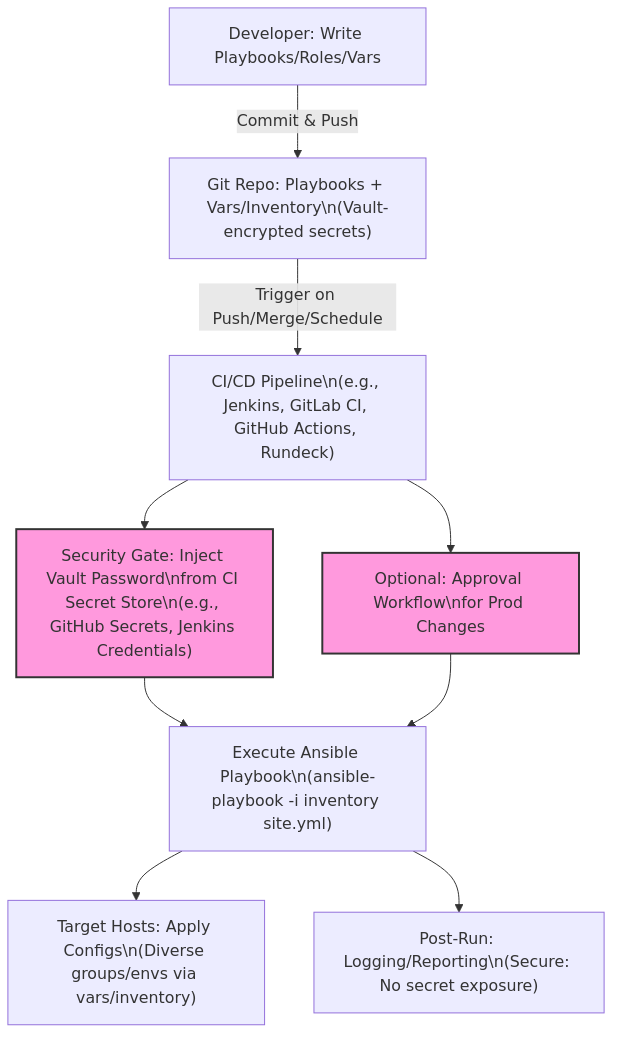
This flow emphasizes security: Secrets never hit Git plaintext, CI/CD handles injection, and approvals prevent unauthorized deploys. In tools like GitHub Actions, use secrets.VAULT_PASSWORD in your YAML workflow.
Wrapping Up: Secure Automation Starts Here
Structuring your Ansible repo thoughtfully—starting simple and scaling securely—sets you up for success. Prioritize Vault for secrets, leverage inventories/vars for flexibility, and integrate CI/CD for reliable execution. This approach minimizes risks while maximizing efficiency, especially in diverse environments.
In the next post, we’ll dive into writing your first roles and testing them with Molecule.
Questions or your own tips? Drop them in the comments or on our feedback portal!
Did you find this post helpful? You can support me.



Author Profile