Streamlining Authentication: Integrating Keycloak with Grafana via OIDC
In today’s complex IT landscapes, managing user authentication across multiple applications can quickly become a nightmare. Enter Keycloak, an open-source identity and access management (IAM) solution, and Grafana, the popular open-source platform for monitoring and observability. By integrating Keycloak with Grafana using OpenID Connect (OIDC), organizations can centralize authentication, enhance security, and simplify user management. In this post, we’ll explore the relationship between these tools, why it’s a smart choice for modern setups, and some key configuration tips—especially around user roles and permissions.
Why Use Keycloak for Grafana Authentication?
Traditionally, applications like Grafana handle authentication internally, often requiring users to create and manage separate passwords. This leads to several issues: password fatigue for users, increased risk of credential breaches, and administrative overhead for IT teams who must handle password resets, expirations, and compliance across silos. Keycloak addresses this by acting as a centralized IAM provider. It supports standards like OIDC, OAuth 2.0, and SAML, allowing single sign-on (SSO) across applications. When integrated with Grafana:
- Centralized User Management: Admins manage users, groups, and roles in one place (Keycloak). Changes propagate automatically—no need to update credentials in Grafana or other apps.
- Enhanced Security: Keycloak supports multi-factor authentication (MFA), social logins, and fine-grained access controls. It reduces the attack surface by avoiding scattered password databases.
- Seamless SSO: Users log in once via Keycloak and gain access to Grafana (and other integrated services) without re-entering credentials.
- Scalability for Enterprises: In environments like Kubernetes clusters, where Grafana might be deployed alongside other tools (e.g., Prometheus for metrics or Loki for logs), Keycloak ensures consistent auth policies.
This setup is particularly valuable in DevOps or cloud-native environments, where microservices and dashboards proliferate. Instead of juggling passwords, focus on insights from your data.
Visualizing the Keycloak-Grafana Relationship
To illustrate how Keycloak and Grafana interact via OIDC, here’s a Mermaid diagram showing the authentication flow:
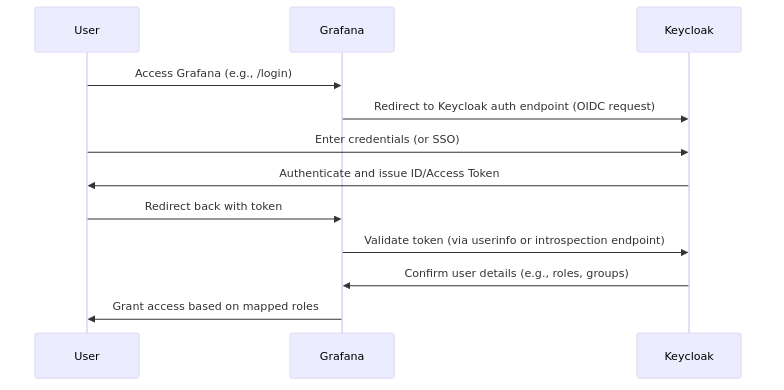
This flow ensures secure token exchange: Grafana doesn’t store passwords; it trusts Keycloak’s validation. In a Kubernetes setup, Keycloak can run as a pod or service, with Grafana configured via environment variables or grafana.ini.
Understanding Default Roles for Keycloak Users in Grafana
When users authenticate via Keycloak (or any OIDC provider), Grafana assigns roles based on token claims—like groups or roles sent from Keycloak. By default, without explicit mapping, users often land in the Viewer role. This is a deliberate design for security: Viewers have read-only access, which prevents accidental (or malicious) changes.
-
Viewer Restrictions: Viewers can browse predefined dashboards but can’t edit them, create new ones, or use advanced features. For example, if you’ve set up a dashboard for viewing logs (e.g., from Loki), a Viewer can see the logs in that dashboard but won’t be able to modify queries, add panels, or explore data freestyle.
-
The Explore Section: Grafana’s Explore is a powerful tool for ad-hoc querying, log tailing, and metric analysis. However, Viewers are limited here—they might view basic queries but can’t edit or create new ones effectively.
This default behavior is great for least-privilege access but can frustrate users who need more interactivity, like developers troubleshooting logs in real-time.
Unlocking More Capabilities: Editor Role and Viewer Editing
To empower your Keycloak-authenticated users:
- Map to Editor Role: In your Grafana configuration (e.g., grafana.ini under [auth.generic_oauth]), use role mapping with JMESPath expressions. For instance, if Keycloak sends a “groups” claim with “admin” or “editor”, map it like this:
role_attribute_path = contains(groups[*], 'editor') && 'Editor' || 'Viewer'Editors can fully use Explore, edit dashboards, and create queries—ideal for log analysis without full admin privileges. But this requires role / group management in keycloak, which can be complex.
The much easier way:
- Enable Viewer Editing: If you want to keep users as Viewers but grant editing rights (e.g., for a controlled environment), set the
viewers_can_editoption to true. In Docker/Kubernetes setups, use the environment variable:
GF_USERS_VIEWERS_CAN_EDIT: "true"This allows regular Viewers to edit dashboards and use Explore more freely, including log viewing and querying, while still restricting admin-level actions like managing users or data sources.
In my experience (and as shared in community forums), this simple toggle often resolves permission hurdles without over-escalating roles. Test in a staging environment to ensure it fits your security needs.
Admin user
You also may want to use give a keycloak user full administrative permissions, ie. to add and configure plugins etc. This is also pretty easy to enable:
GF_AUTH_GENERIC_OAUTH_ALLOW_ASSIGN_GRAFANA_ADMIN: "true"without having to mess with groups in keycloak.
Conclusion
Integrating Keycloak with Grafana via OIDC isn’t just about convenience—it’s about building a secure, scalable auth foundation. By centralizing management, you reduce risks and empower users to focus on data insights rather than login woes. Whether you’re running this in Kubernetes or standalone, start with default Viewer roles for safety, then fine-tune with mappings or the GF_USERS_VIEWERS_CAN_EDIT variable. If you’re setting this up, check the official docs for Keycloak and Grafana— they have excellent guides. Have you tried this integration? Share your tips in the comments or on our feedback portal !
Did you find this post helpful? You can support me.




Author Profile

Latest entries
 blog19.03.2026Kubernetes – Adventures – Pilot
- blog15.03.2026ConfDroid Puppet Modules – NRPE
- blog14.03.2026ConfDroid Puppet Modules – Nagios
- blog14.03.2026Databases – Postgresql – PGbouncer